Wolfe Wave Dashboard
Wolfe Wave Dashboard v1.25 is a professional MetaTrader 5 indicator designed as a multi-symbol, multi-timeframe monitoring tool. It continuously scans up to 20 symbols across selectable timeframes (M1 to MN1) and identifies the freshest valid Wolfe Wave patterns based on strict geometric rules (alternating pivots, convergence of lines 1-3 and 2-4, line tolerance, minimum/maximum pattern width, etc.).
Key features:
- Highly optimized and chunked scanning engine that only processes new closed bars, keeping CPU usage low even with many symbol/timeframe combinations.
- Clean interactive dashboard showing Symbol, Timeframe, Direction, Pattern name, Age (bars since point 5), historical Average Time-To-Target (TTT), and an “Open” button.
- One-click chart opening that automatically draws the complete pattern (trend lines 1-3 & 2-4, filled triangle, numbered labels, entry arrow, and optional target line 1-4).
- Configurable alerts (popup, sound, email, push notification).
- Persistent TTT statistics stored in a CSV file for long-term average tracking.
- Extensive input parameters for performance tuning, pivot strength, pattern size limits, visual appearance, and dashboard scaling/font size.
The code is well-structured, robust, and focused on stability and efficiency, making it suitable for both discretionary traders and systematic multi-symbol monitoring.
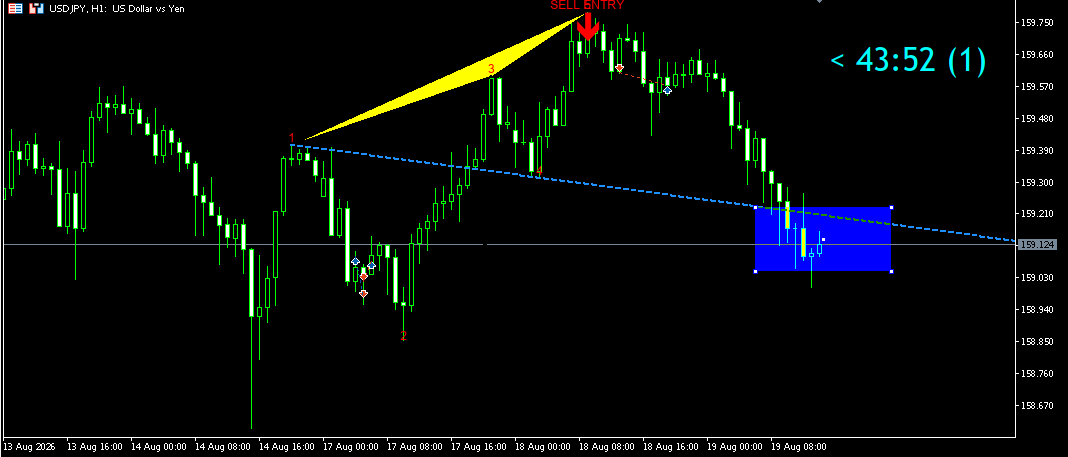
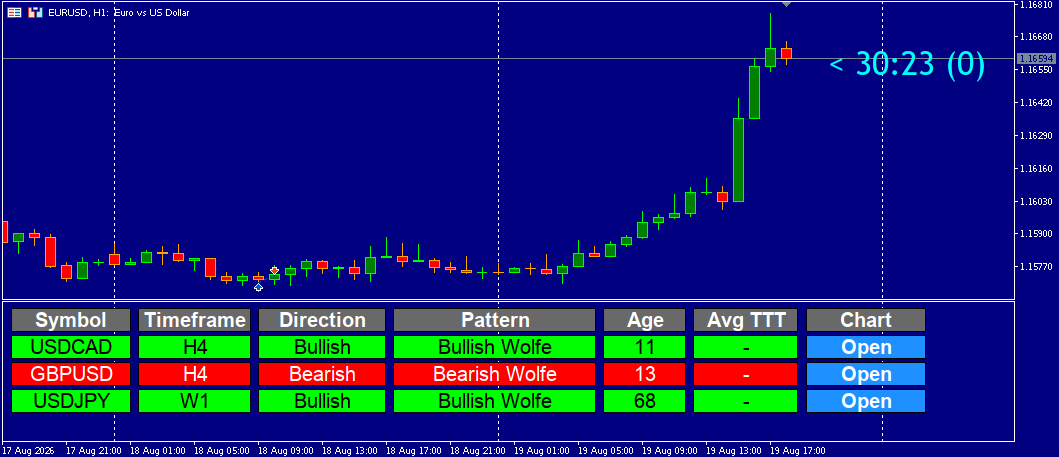
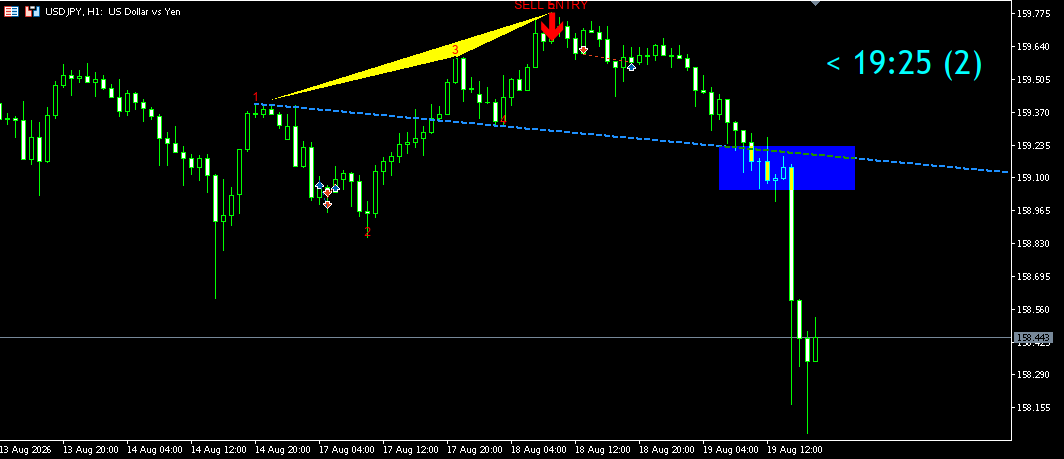
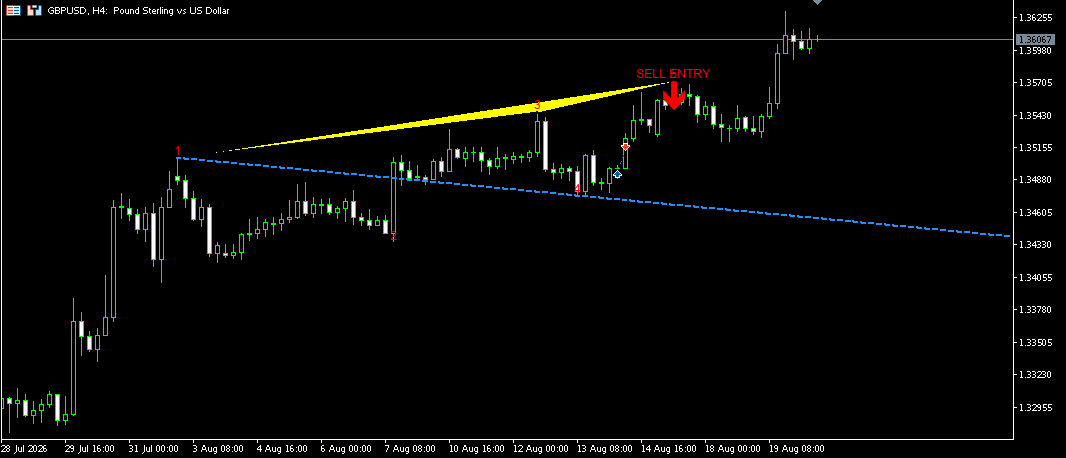

NOTE:
Disclaimer: Price will not always reach the EPA line.
Wolfe Wave Dashboard V 1.30 Update:
PERFORMANCE MODE (NORMAL / ECO)
– New input “Mode”: NORMAL or ECO. Same signals in both modes, ECO simply does less work.
– NORMAL: timer every 1 s (InpScanSeconds), up to 20 scans per tick, retry after 5 s
on data errors. Alerts fire right at bar open.
– ECO (low CPU, fewer wake-ups): timer every 30 s by default (InpEcoScanSeconds, min 10 s),
up to 10 scans per tick (InpEcoMaxScans), retry after 30 s, shorter work slices.
Recommended for large symbol lists or weak PCs/VPS. Alerts may arrive a few seconds
to half a minute after bar open.
– Scanning is driven by a cheap “new bar due” gate: only symbol/timeframe pairs that really
got a new bar are scanned, so signals are never delayed by round-robin chunking.
CHART DISPLAY (TP / SL)
– TP1, TP2, TP3 and SL tags now sit in the right margin of the chart, never over the candles.
– Fixed-size tags, sized exactly to the text (font 16 by default).
TP tags: blue fill + gold border. SL tag: dark red fill + gold border.
– TP/SL level lines are 1 px dotted and run across the whole chart, to the left of each tag.
Tags are drawn on top of the lines.
– Tags follow their price levels when the price scale changes.
TARGET LEVELS (Fibonacci retracement of the 4-5 leg, measured from point 5)
– TP1 = 0.382
– TP2 = 0.618
– TP3 = 1.000 (back to point 4)
– SL = 0.10 of the 4-5 leg beyond point 5
– Formula: TP = P5 + fib x (P4 – P5). All levels are adjustable inputs.
OTHER IMPROVEMENTS
– Transient data errors no longer wipe a pattern or skip a bar.
– Alerts only for fresh patterns (no spam on attach/restart).
– No Sleep() in OnChartEvent; opening a chart from the dashboard is non-blocking.
– Input InpRequireP5Beyond3 (default true): strict Wolfe rule, point 5 must go beyond point 3.
– Safer handling: sub-window not ready, division by zero, stale clicks.