Risk Calculator Panel with Draggable SL and TP Lines
Risk Calculator Panel is a position size calculator for MetaTrader 5. Instead of typing prices, you drag a Stop Loss line on the chart and the panel immediately shows the correct lot size for the risk you choose. It is an indicator, so it never opens, closes or modifies trades.
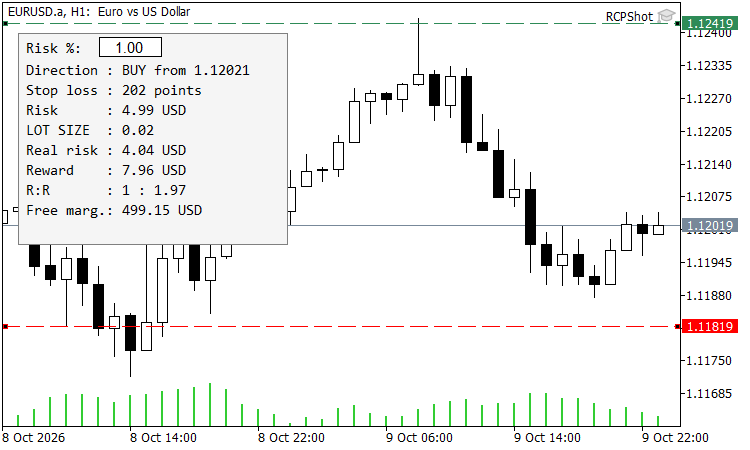
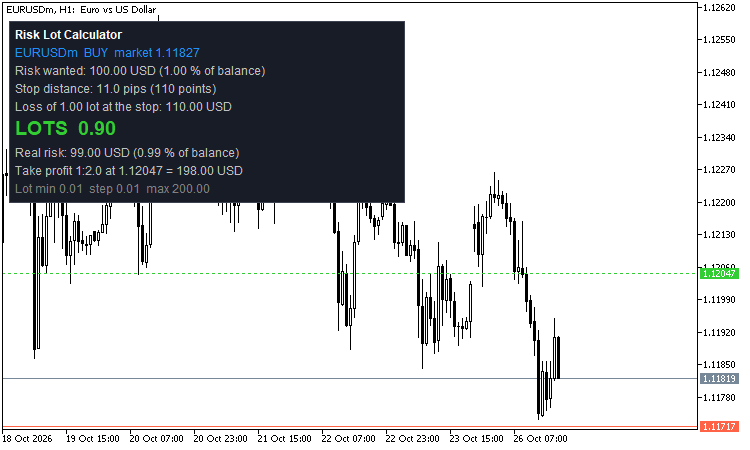
Figure 1. Risk Calculator Panel on EURUSD H1: drag the red SL line and read the lot size
How to use
- Attach the indicator to any chart. A red dashed Stop Loss line and a green dashed Take Profit line appear near the current price.
- Drag the Stop Loss line to where you want your stop. If it is below price the panel calculates a BUY from the Ask, if it is above price it calculates a SELL from the Bid.
- Drag the Take Profit line to see the reward and the reward:risk ratio.
- Type a new risk percentage in the box at the top of the panel and press Enter. No need to reopen the inputs.
What the panel shows
- Direction and entry price (Ask for buys, Bid for sells).
- Stop loss distance in points. It turns red if the stop is closer than the broker’s minimum stop level.
- Risk – the money you want to risk (percentage of balance, equity or free margin, or a fixed amount).
- LOT SIZE – always rounded down to the symbol’s volume step, so you never risk more than you asked for.
- Real risk – the money actually at risk with the rounded lot. If even the minimum lot is too big for your risk, it turns red and a warning is shown.
- Reward and R:R from the Take Profit line.
- Margin for the position when the terminal allows the calculation, otherwise your free margin.
The calculation uses the symbol’s tick size and tick value, which the terminal already converts into your account currency. This makes it correct for forex majors, crosses, metals, indices and crypto without any manual settings.
Input parameters
| Input | Description |
| InpRiskPercent | risk per trade in percent (default 1.0). |
| InpRiskBase | calculate the risk from Balance, Equity or Free margin. |
| InpFixedRisk | fixed risk in account currency; a value above 0 overrides the percentage. |
| InpSLPoints, InpTPPoints | initial distance of the lines in points (TP 0 hides the TP line). |
| InpPanelX, InpPanelY, InpFontSize | panel position and size. |
| InpPanelColor, InpTextColor, InpSLColor, InpTPColor | colors. |
The lines keep their position when you change the timeframe. Removing the indicator removes all of its objects from the chart.