GDS Renko Liquidity Sweep Lab
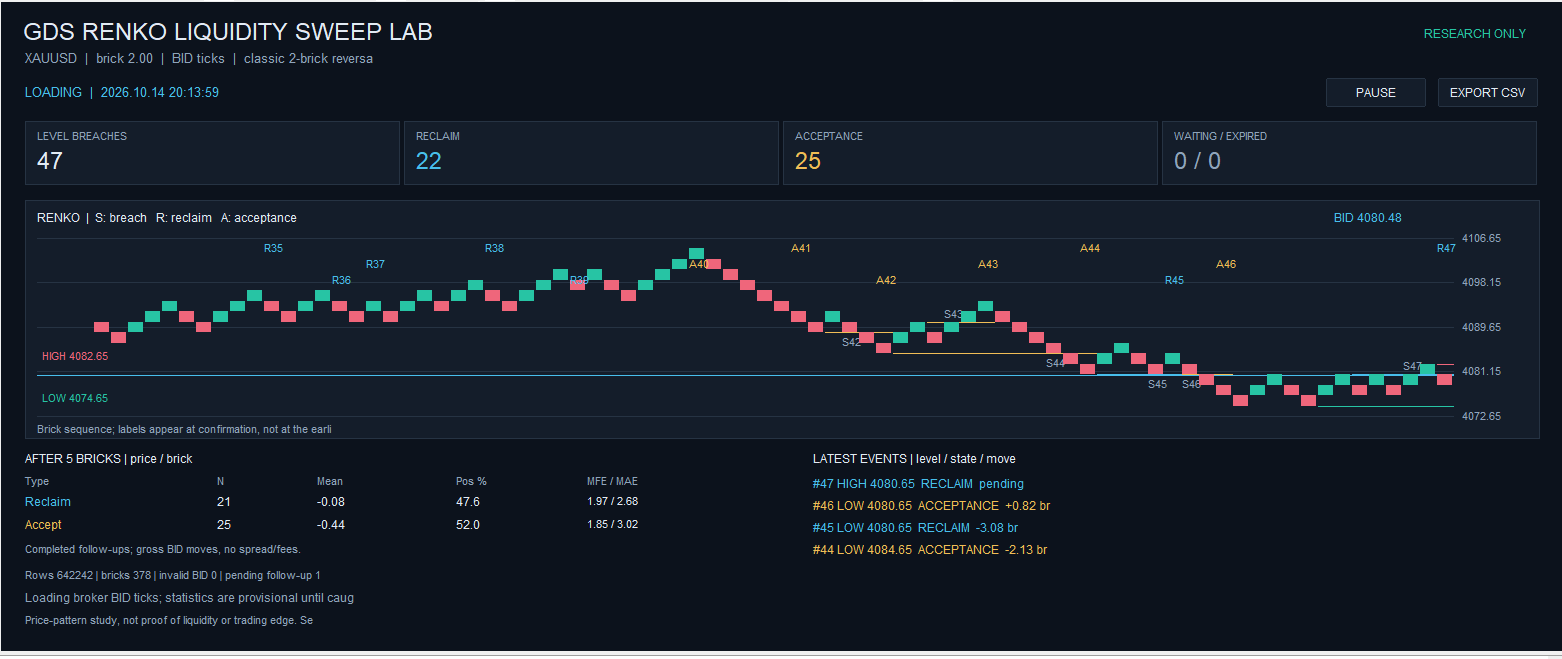
GDS Renko Liquidity Sweep Lab is a research indicator for MetaTrader 5. It builds fixed-size Renko from broker Bid ticks, marks confirmed swing levels and studies what happens after price breaches them. A dashboard displays the events and subsequent price movement, with an event log available for CSV export. The indicator does not place orders.
Event logic
Renko uses a classic two-brick reversal. A swing level is confirmed only when a reversal brick ends a run that meets the minimum-length setting. The first incomplete run at the history boundary is excluded. The indicator monitors the latest confirmed upper and lower levels. Each level can produce one breach event; newer swings replace older unbreached levels, and unbreached levels expire after their configured maximum age.
A breach occurs when Bid reaches the configured distance beyond a previously confirmed level. A reclaim (R) requires both the latest completed brick close and Bid to return inside the level by the reclaim buffer. Acceptance (A) requires the configured number of consecutive completed closes beyond the breach buffer, with both the latest close and Bid still beyond it.
Classification takes place on a later tick that creates at least one brick, after all bricks from that tick have been processed. Intermediate brick prices within a gap are not treated as executable quotes. Events that remain unclassified beyond the brick-based deadline expire; waiting and expired events remain in the CSV log.
Dashboard and statistics
The dashboard marks breaches as S, reclaims as R and acceptance as A. Separate statistics for reclaim and acceptance show completed sample counts, mean directional Bid movement, the percentage of positive outcomes, and average maximum favorable/adverse excursion (MFE/MAE), expressed in brick units.
Movement is measured from the Bid recorded at classification over a follow-up horizon counted in completed bricks. For reclaim, the measured direction is back inside the level; for acceptance, it is beyond the level. Only completed follow-ups enter these statistics. Pos % is a price-change statistic, not a trading win rate. Overlapping events are not independent observations.
Installation and use
Copy the MQ5 file to MQL5/Indicators , compile it in MetaEditor and attach it to a separate normal chart. Allow broker tick history to load. The dashboard requires a chart area of at least 760 × 520 pixels. Open the indicator settings through Ctrl+I.
InpBrickSize is expressed in price units; zero selects 200 symbol points. The effective size is rounded to the symbol’s price-step grid. Breach and reclaim buffers are expressed in brick units, rounded up to that grid and have a minimum effective distance of one price step, even when set to zero.
With InpHistoryStart=0 , the indicator loads InpHistoryHours before the latest broker quote and continues with incoming ticks. A nonzero start uses broker server time and selects a fixed interval of the same duration. PAUSE / RESUME retains the processing cursor.
EXPORT CSV saves all recorded breach events to MQL5/Files/GDS_Renko_Sweep_Lab . Each event row includes settings, effective price buffers, timestamps, sequence numbers, classification and follow-up status. The full export path is printed in the Experts log.
Limitations
“Liquidity” describes a price-pattern hypothesis. The indicator does not detect hidden stop orders or measure order-book liquidity. Statistics exclude spread, commission and slippage and do not establish a profitable trading strategy.
History depends on the broker; missing ticks are not reconstructed from OHLC. Changing the history interval or brick size can change the levels and results. No DLL, external indicator, custom symbol or offline chart is required. Removing the indicator restores the saved chart visibility and background and deletes its own chart objects.