SR Zone Scanner
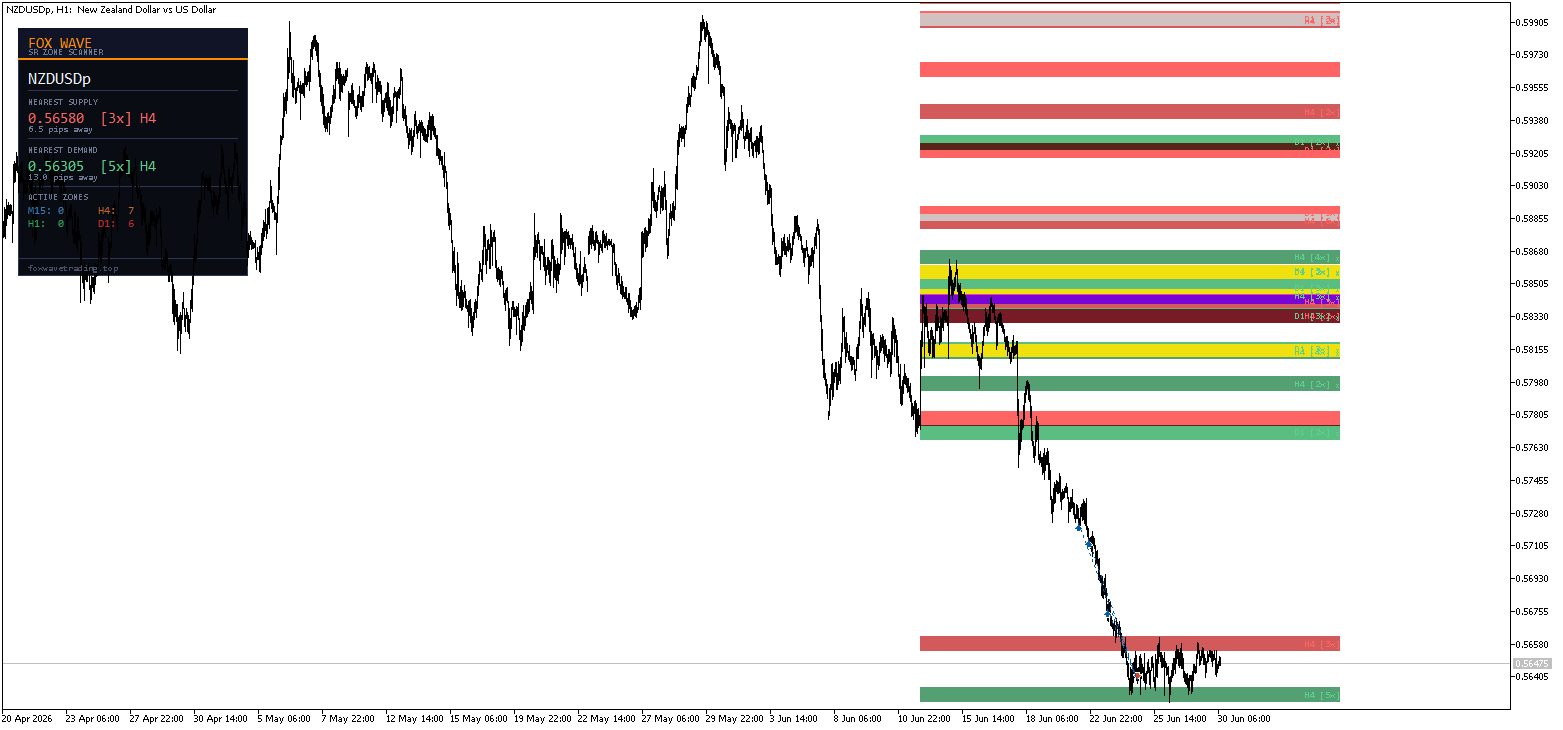
FoxWave SR Zone Scanner automatically detects and draws Supply & Demand zones from multiple timeframes directly on your chart — no manual drawing, no guesswork. See exactly where price has reacted before, how strong each level is, and get alerted the moment price approaches a key zone.
Built for price action and scalping traders who need clear, objective levels instead of subjective hand-drawn lines.
What it does
► Automatic Multi-Timeframe Zone Detection The indicator scans up to four timeframes — M15, H1, H4 and D1 — and identifies areas where price has repeatedly reversed. Each zone is built from clustered pivot highs (Supply) or pivot lows (Demand), so you see real structure, not arbitrary lines.
Zones from higher timeframes (H4, D1) are drawn in deeper, more saturated colors — instantly showing you which levels carry more weight, even on a lower timeframe chart like M5.
► Zone Strength Rating Every zone displays a touch-count label, e.g. H1 [4x] . The more times price has reacted at that level, the stronger and more reliable the zone. Set a minimum touch count so only meaningful zones are drawn — no clutter from single-touch noise.
► Active / Broken Zone Tracking Zones automatically update their status. Once price closes through a zone, it’s marked broken and won’t trigger further alerts — keeping your chart and notifications relevant to current price structure.
► Instant Zone Alerts The moment price approaches or enters a strong zone, you get notified through:
- 🔔 Popup — on-screen alert window
- 📱 Push notification — straight to your MetaTrader mobile app
- 📧 Email — sent to your registered MT5 address
Set the alert distance in pips so you’re notified just before price reaches the zone — perfect for scalpers who want to be ready for a reaction trade.
► Info Panel A compact Fox Wave panel shows at a glance:
- Nearest Supply zone above price — exact level, touch count, source timeframe, distance in pips
- Nearest Demand zone below price — same detail
- Active zone count per timeframe (M15 / H1 / H4 / D1)
Key Features
- Scans 4 timeframes simultaneously: M15, H1, H4, D1
- Independent show/hide toggle per timeframe
- Smart pivot clustering — merges nearby touches into one clean zone
- Configurable minimum touch count to filter weak levels
- Automatic broken-zone detection
- Triple alert system: popup + push + email, each switchable independently
- Smart alert reset — no duplicate notifications while price stays in the zone
- Full color customization per timeframe, per zone type (Supply/Demand)
- Lightweight — periodic rescan, no per-tick recalculation load
- Consistent Fox Wave dark panel design
Inputs Reference
Timeframes to Scan
| Parameter | Default | Description |
|---|---|---|
| UseTF_M15 | true | Include M15 in scan |
| UseTF_H1 | true | Include H1 in scan |
| UseTF_H4 | true | Include H4 in scan |
| UseTF_D1 | true | Include D1 in scan |
Zone Detection
| Parameter | Default | Description |
|---|---|---|
| LookbackBars | 300 | Number of bars scanned per timeframe |
| MinTouches | 2 | Minimum pivot touches to form a zone |
| ZoneWidthPips | 8.0 | Width of each drawn zone (pips) |
| MergeDistPips | 5.0 | Merge pivots closer than this distance |
| MinBarsBetween | 3 | Minimum bar separation between touches |
Display
| Parameter | Default | Description |
|---|---|---|
| ShowM15Zones / ShowH1Zones / ShowH4Zones / ShowD1Zones | true | Toggle zones per timeframe |
| ShowZoneLabels | true | Show touch-count labels on zones |
| ShowPanel | true | Show the info panel |
| MaxZonesPerTF | 6 | Maximum zones drawn per timeframe |
Alerts
| Parameter | Default | Description |
|---|---|---|
| AlertOnZoneEntry | true | Enable zone proximity/entry alerts |
| AlertPips | 2.0 | Trigger distance from zone (pips) |
| AlertPopup | true | On-screen popup alert |
| AlertPush | true | Push notification to mobile app |
| AlertEmail | false | Email alert |
Colors Fully independent color control for Supply and Demand zones on every timeframe, plus complete panel color customization.
Panel Position
| Parameter | Default | Description |
|---|---|---|
| PanelX | 15 | Horizontal offset from chart edge |
| PanelY | 25 | Vertical offset from chart edge |
How to set up push notifications
- Open MetaTrader 5 on your mobile device
- Go to Settings → Messages and copy your MetaQuotes ID
- In MT5 desktop: Tools → Options → Notifications
- Paste your MetaQuotes ID and enable notifications
- Set AlertPush = true in the indicator inputs
Who is it for?
- Price action traders who rely on Support & Resistance but are tired of manually redrawing zones
- Scalpers who want to know instantly when price reaches a key reaction level
- Multi-timeframe traders who want H4/D1 structure visible while trading on M5/M15
- Anyone who wants objective, touch-validated zones instead of subjective lines
Trade with the same higher-timeframe structure that institutional levels are built around — automatically detected, clearly labeled, and impossible to miss thanks to real-time alerts.
Compatibility
- Platform: MetaTrader 5
- Works on all symbols: Forex pairs, indices, commodities, crypto, metals
- Works on any chart timeframe (zones come from M15/H1/H4/D1 regardless of chart period)
- No DLL imports required