Prop Firm Daily Loss Tracker – Daily Loss Limit Monitor
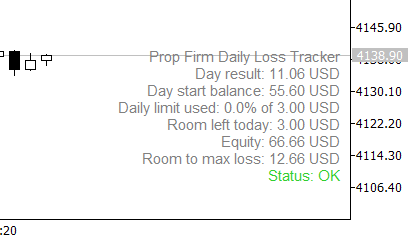
Prop Firm Daily Loss Tracker
A small on-chart panel that tracks how much of the daily loss limit of a funded / prop firm account is already used. It is a monitor only: it gives no signals and places no orders.
What it shows:
Day result in account currency (closed trades plus floating).
Day start balance.
Percent of the daily loss limit used.
Room left today and room left to the max total loss.
Current equity and a status line: OK, WARNING or LIMIT REACHED.
How it works:
Day result = closed result of the day + (equity – balance).
Daily limit = account size x daily loss percent.
Max loss floor = account size x (1 – max loss percent).
The day starts at the server hour you choose in the inputs. Deposits and withdrawals are excluded from the day result.
When the used share of the daily limit reaches the warning level, and again when it reaches 100%, the indicator shows one alert per day. A push notification can be enabled.
Inputs:
Account size, daily loss limit (%), max total loss limit (%).
Server hour when the trading day starts.
Warning level (%), popup alert, push notification.
Panel corner, font size, text color.
Notes:
The loss limits are values you set to match your own prop firm rules, including how your firm counts the day. Always check them against the rules of your firm.
Set the account size to the starting balance of your challenge or funded account. If it is far from the real account, the max loss line will not make sense.
The day start balance is calculated from the account history, so the history should be loaded in the terminal.
Works on any symbol. The panel refreshes on ticks.