Prime Quantum AI — TRADE WITH AI (Anthropic Claude, OpenAI GPT, Google Gemini, DeepSeek, xAI Grok).
Prime Quantum AI is an Expert Advisor for MetaTrader 5 that combines a
classical technical pre-filter (ADX + Alligator) with AI vision-based
chart analysis from major AI providers.
HOW IT WORKS
The EA runs a two-stage decision process. First, on each tick, it checks
the user’s selected timeframe for a trend setup using ADX (above the
configurable minimum level) combined with Alligator alignment and DI+/DI-
direction. When this pre-filter signals BULLISH or BEARISH, the EA
captures three chart screenshots at adaptive timeframes (entry, mid,
context — automatically chosen from the user’s TF input) and sends them
to the configured AI provider. The AI returns a JSON response with
direction, confidence (0-100), stop-loss price, take-profit price, and
reasoning. A trade is opened only if the AI direction matches the
pre-filter signal AND confidence meets the user’s minimum threshold.
RECOMMENDED SYMBOL AND TIMEFRAME
– Symbol: any major forex pair, gold (XAUUSD), or major indices
– Timeframe input (TF): M15 default. M1-M5 for scalping, H1-H4 for day
trading, D1 for swing trading. The screenshot stack is selected
automatically from this input.
KEY EXTERNAL VARIABLES
– TF: trading timeframe (controls pre-filter and screenshot stack)
– InpAPIKey: your AI provider API key
– InpProviderOverride: auto / anthropic / openai / google / deepseek / xai
– InpMinConfidence: minimum AI confidence to take a trade (default 70)
– InpScanIntervalSec: cooldown between AI calls (default 120s)
– InpAccountType: Standard Broker / Prop Firm / Funded
– InpRiskMode: fixed lot, % balance, % equity, fixed $, % free margin
– InpSLTPMode: AI decides / fixed pips / fixed points / AI SL with R:R
– InpADXPeriod, InpADXMinLevel: ADX pre-filter parameters
– InpJawPeriod/Shift, InpTeethPeriod/Shift, InpLipsPeriod/Shift: Alligator
– InpATRTrailPeriod: ATR period for ATR-based trailing stop
– News, time, day, and spread filters with full configuration
REQUIREMENTS
1. MetaTrader 5
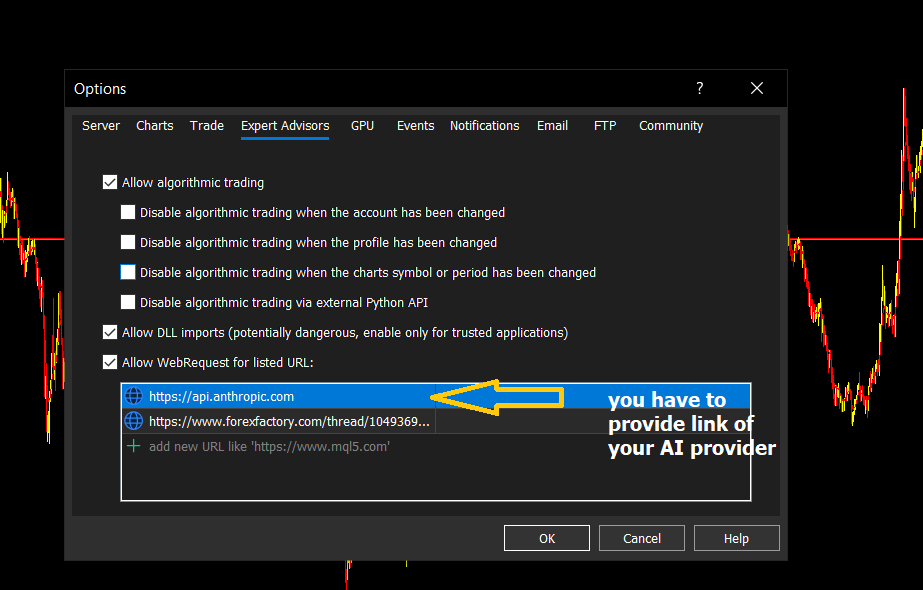
2. WebRequest must be enabled in Tools > Options > Expert Advisors >
Allow WebRequest, with the URL of your chosen provider added:
– Anthropic Claude: https://api.anthropic.com
– OpenAI GPT: https://api.openai.com
– Google Gemini: https://generativelanguage.googleapis.com
– DeepSeek: https://api.deepseek.com
– xAI Grok: https://api.x.ai
3. A valid API key from one of the supported providers (paste into
InpAPIKey input). Provider is auto-detected from key format.
WHERE TO GET API KEYS
– Anthropic Claude: https://console.anthropic.com/
– OpenAI GPT: https://platform.openai.com/api-keys
– Google Gemini: https://aistudio.google.com/app/apikey
– DeepSeek: https://platform.deepseek.com/
– xAI Grok: https://console.x.ai/
NOTES
– The EA charges no internal fee, but the AI provider charges per API
call (typically $0.01-$0.03 per analysis). Set InpScanIntervalSec to
control your daily cost.
– Always test on a demo account before using on live funds.