Fixed-Width Fractional Differencing (FFD)
Raw forex and futures prices are non-stationary: standard regression and classification models trained on them face severe look-ahead bias and spurious correlations. The naive fix — integer differencing — eliminates non-stationarity but destroys all price memory in the process, discarding the very autocorrelation structure that a predictive model needs.
Fixed-width fractional differencing (FFD), introduced in Chapter 5 of Advances in Financial Machine Learning (López de Prado, 2018), resolves this by differencing at a non-integer order d ∈ (0, 1) that is just sufficient for stationarity while retaining maximum memory. This submission provides a production-grade MQL5 implementation of that method.
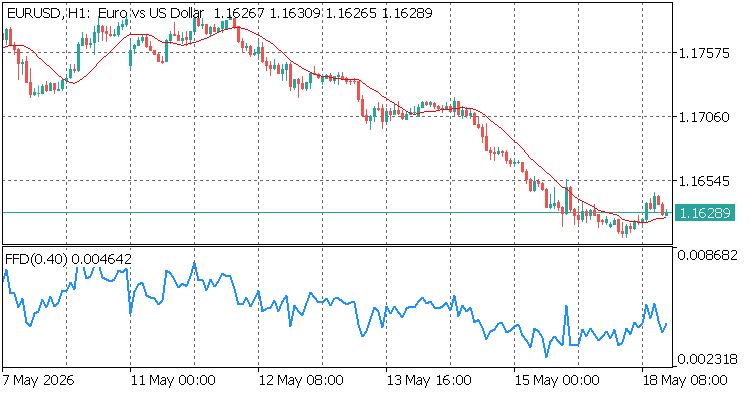
Two-panel illustration of FFD output: non-stationary raw price (a) and stationary FFD series (b) with the lookback window marked
Components
- FFDEngine.mqh — Header-only library containing the CFFDEngine class. Provides Init(), Compute() (single bar), and ComputeBuffer() (full indicator buffer with prev_calculated optimization). No dynamic memory allocation after OnInit().
- FFD.mq5 — Custom indicator that wraps CFFDEngine. Draws the FFD series in a separate chart window. Supports all ENUM_APPLIED_PRICE values.
How the Algorithm Works
The weight vector is defined by the recurrence (AFML eq. 5.4):
w[0] = 1 w[k] = -w[k-1] * (d – k + 1) / k, k = 1, 2, …
Iteration stops when |w[k]| < threshold. The vector is then reversed so the oldest price in the lookback window receives the smallest weight and the newest price receives 1.0. The FFD value at bar i is the dot product of the reversed weight vector with the log-price window [i−width, …, i].
For d = 0.4 and threshold = 1e-5, the window width is 1 457 bars. For threshold = 1e-3 it is 54 bars. The threshold controls the stationarity–memory tradeoff: smaller values preserve more memory at the cost of a wider lookback requirement.
Input Parameters
| Parameter | Default | Description |
|---|---|---|
| InpD | 0.4 | Fractional-differencing order. Typical range: 0.1–0.9. Values above 0.5 produce near-integer differencing; values below 0.1 produce near-raw prices. The optimal d is the minimum value that passes an ADF test at the chosen significance level — see the companion article for the Python search procedure. |
| InpThreshold | 1e-5 | Weight cutoff τ. Iteration stops when |w[k]| < τ. Smaller values produce a wider window and better memory preservation but require more historical bars before the first valid output. Recommended range: 1e-4 to 1e-5. |
| InpUseLog | true | Apply ln(price) before differencing. Recommended for raw price series (closes, opens, highs, lows). Set false only when the input is already a return or log-return series. |
| InpPrice | PRICE_CLOSE | Applied price type. Accepts any ENUM_APPLIED_PRICE value: PRICE_OPEN, PRICE_HIGH, PRICE_LOW, PRICE_CLOSE, PRICE_MEDIAN, PRICE_TYPICAL, PRICE_WEIGHTED. |
Installation
- Copy FFDEngine.mqh to your MQL5Include folder (or the subfolder specified during CodeBase download — see file locations below).
- Copy FFD.mq5 to MQL5IndicatorsDownloads (placed there automatically on CodeBase download).
- Compile both files in MetaEditor. The indicator should compile without warnings under #property strict.
- Attach FFD to any chart. The indicator window will appear below the main chart after the lookback window (width + 1 bars) has been filled.
Using CFFDEngine in Your Own EA or Indicator
FFDEngine.mqh is a header-only library. Include it and call Init() once in OnInit():
#include <FFDEngine.mqh>


//--- Global instance of the Fixed-Width Fractional Differencing engine

CFFDEngine g_engine;


//+------------------------------------------------------------------+

//| Expert initialization function                                   |

//+------------------------------------------------------------------+

int OnInit()

  {

//--- Initialize FFD engine with d=0.4, threshold=1e-5, and Log Transform enabled

//--- This configuration builds a static memory weight window during the EA initialization phase

   if(!g_engine.Init(0.4, 1e-5, true))

     {

      Print("FFD engine init failed");

      return(INIT_FAILED);

     }

   return(INIT_SUCCEEDED);

  }


//+------------------------------------------------------------------+

//| Expert tick function                                             |

//+------------------------------------------------------------------+

void OnTick()

  {

//--- Query the engine to find out exactly how many historical bars are required

//--- to compute a valid FFD value based on the threshold cutoff

   int need = g_engine.GetMinBars();

   double close[];


//--- Fetch the required depth of historical price data.

//--- If history is not yet synchronized or insufficient, skip execution to avoid errors.

   if(CopyClose(_Symbol, _Period, 0, need, close) < need)

      return;


//--- Ensure the array indexing matches chronological order (oldest bar at index 0)

//--- to correctly align with the reversed FFD weight vector matrix transformations

   ArraySetAsSeries(close, false);


//--- Compute the stationary, fractional-differenced output value for the current live bar

   double ffd_value = g_engine.Compute(close, need);


//--- Use ffd_value as a feature for your model.

  }
Cross-Validation Against Python
The companion file FFDValidation.mq5 (available in the article download) exports FFD values to a CSV file. The Python script ffd_cross_validate.py recomputes the same values using the afml library and compares bar-by-bar. On 5 000 bars of EURUSD H1 with d = 0.4 and threshold = 1e-5, the maximum absolute difference is below 1e-12.
Performance Notes
- Weight vector allocation: once in OnInit(). Zero allocation on the tick path.
- Per-bar computation: O(width) dot product. On modern hardware, a dot product over 1 457 elements completes in under 50 μs.
- ComputeBuffer() uses the prev_calculated argument to skip already-computed bars — only the current incomplete bar is recomputed on each tick.
References and Companion Article
- López de Prado, M. (2018). Advances in Financial Machine Learning, Chapter 5 (Fractional Differentiation), pp. 76–95. Wiley.
- Full theory, Python implementation, and ADF-based parameter search: Feature Engineering for ML — Part 2: Implementing Fixed-Width Fractional Differentiation in MQL5 by Patrick M. Njoroge.
- Companion validation tools: FFDValidation.mq5 and ffd_cross_validate.py — included in the article download package.