Session High Low – Asian, London and New York Range Boxes
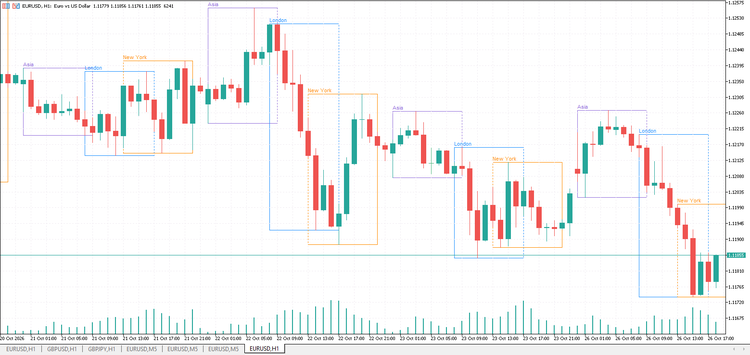
Session High Low draws the three main trading sessions on the chart: Asia, London and New York. Each session is shown as a colored box from its start to its end, covering the session’s high and low. After a session closes, dotted lines extend its high and low for a few hours, so you can see at a glance where a breakout or a retest happens.
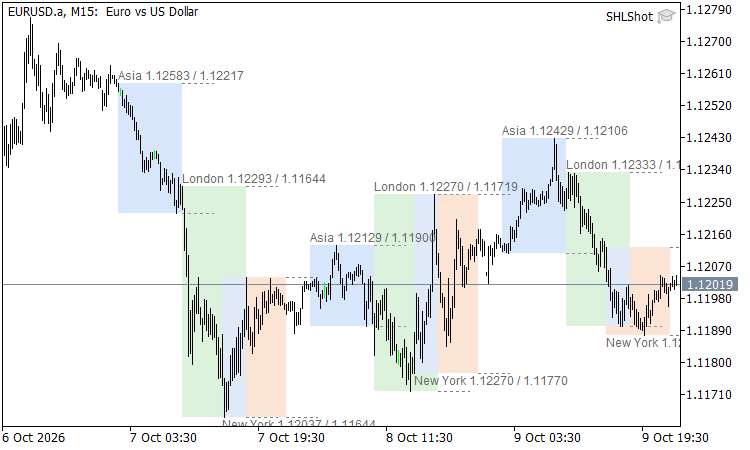
Figure 1. Asian, London and New York session boxes with high/low labels
Why it is useful
- The Asian range is the classic reference for London breakout strategies.
- The London high and low are often retested or broken during the New York session.
- The size of each range (in points, shown in the tooltip) tells you how quiet or volatile a session was.
Features
- Three sessions, each with its own on/off switch, start and end time and box color.
- Sessions that cross midnight are handled automatically (for example 22:00 – 07:00).
- The high and low are taken from M5 data, so the ranges are identical on M1, M5, M15, M30 and H1 charts.
- Labels with the session name, high and low. The New York label is placed under its box so it does not overlap London.
- Hover over a box to see the session high, low and range in points.
- The current session box keeps growing live as new highs or lows are made.
- Weekends and holidays are skipped automatically.
- Hidden on timeframes above the chosen maximum to keep higher timeframe charts clean.
Input parameters
- InpDays – number of days to draw (default 10).
- InpMaxTF – hide the indicator on timeframes above this one (default H1).
- InpShowLabels – show session names and prices.
- InpExtendHours – how long to extend the high and low lines after a session ends, in hours (0 turns them off).
- InpAsiaOn, InpAsiaStart, InpAsiaEnd, InpAsiaColor – Asian session settings.
- InpLondonOn, InpLondonStart, InpLondonEnd, InpLondonColor – London session settings.
- InpNYOn, InpNYStart, InpNYEnd, InpNYColor – New York session settings.
Important: session times are in broker server time (the time shown in Market Watch). The defaults (Asia 02:00 – 10:00, London 10:00 – 18:00, New York 15:00 – 23:00) suit brokers whose server runs at GMT+3 in summer. If your broker uses a different server time, shift all times by the difference.